
Francisco Javier Cruces Doval
Sunday, November 23, 2025 | 18 minutes
17 - Installing OpenStack using kolla-ansible on virtual machines
Up to now we installed OpenStack manually, configuring each step one by one. Now we jump to automation with Ansible, which lets you run deployments with almost no human intervention.
The idea is simple: define your settings in a few files and Ansible runs the whole process unattended. These files can be versioned in Git so you can repeat or tweak deployments later.
Ansible simplifies OpenStack by concentrating most settings in a handful of files with sensible defaults, valid for both simple environments and more complex ones (multi-node, clustering, advanced networking, etc.).
The deployment relies on community Docker containers, without advanced tech like Swarm. The architecture stays simple: each node runs Docker and Ansible orchestrates everything.
Even so, automation does not replace knowing the OpenStack services—you still need to understand them to avoid installation errors.
The files I use are in my repository. You can clone it with SSH or HTTPS:
git clone git@github.com:javierasping/openstack-vagrant-ansible.git
git clone https://github.com/javierasping/openstack-vagrant-ansible.git
1. Create the following networks in KVM (libvirt):
First define the base libvirt networks that all lab VMs will use.
If you use my repository you will find the XML network definitions under kolla-ansible.
Management network
- Type: isolated / internal
- IPv4 address: 10.0.0.1
- Netmask: 255.255.255.0
- DHCP: disabled
Provider network
- CIDR: 203.0.113.0/24
NAT network
- Used for Internet access
2. Lab nodes
Below are the characteristics of the nodes used in the lab. This configuration lives in the Vagrantfile in the repo, so you do not need to create them manually.
You can easily tweak values (CPU, RAM, disks, etc.) directly in the Vagrantfile based on your machine resources or needs.
Node summary
| Node | CPU | RAM | Disk(s) | Networks |
|---|---|---|---|---|
| controller | 2 vCPU | 6144 MB | 20 GB | NAT, management, provider |
| compute1 | 1 vCPU | 2048 MB | 10 GB | NAT, management, provider |
| compute2 | 1 vCPU | 2048 MB | 10 GB | NAT, management, provider |
| block1 | 1 vCPU | 1024 MB | 10 GB + 30 GB (Cinder) | NAT, management, provider |
| deployment | 1 vCPU | 2048 MB | 40 GB | NAT, management |
💡 Note: Promiscuous mode is not needed in KVM/libvirt (unlike VirtualBox) because networking is handled natively.
You can also:
- Reduce resources if your machine is limited
- Add more compute nodes
- Split roles across nodes for more advanced setups
This lab is meant as a flexible base to experiment with OpenStack.
You can create the networks manually with the commands below (definitions are in the repo), although the Vagrantfile will create them automatically:
virsh net-define provider.xml
virsh net-start provider
virsh net-autostart provider

virsh net-define mgmt-net.xml
virsh net-start mgmt-net
virsh net-autostart mgmt-net
To bring up the environment run:
javiercruces@FJCD-PC:~/Documentos/openstack-vagrant-ansible/kolla-ansible$ vagrant up
3. Prepare the nodes
Here we leave each VM with base packages installed and ready to run Ansible on top.
Networking and IPs are handled automatically by the Vagrantfile, so you do not need to edit /etc/hosts or adjust IPs manually.
3.1 Prepare the controller node
On controller, run as superuser:
apt update -y
apt upgrade -y
apt install -y python python-simplejson glances vim
reboot
3.2 Prepare compute1 and compute2
On compute1 and compute2, run as superuser:
apt update -y
apt upgrade -y
apt install -y python python-simplejson glances vim
echo "configfs" >> /etc/modules
update-initramfs -u
reboot
3.3 Prepare the block1 node
On block1, run as superuser:
apt update -y
apt upgrade -y
apt install -y python python-simplejson glances vim
apt install -y lvm2 thin-provisioning-tools
pvcreate /dev/vdb
vgcreate cinder-volumes /dev/vdb
echo "configfs" >> /etc/modules
update-initramfs -u
reboot
3.4 Prepare the deployment VM
On deployment, run as superuser:
apt update -y
apt install -y python3-jinja2 python3-pip libssl-dev curl glances vim python3.12-venv
pip install -U pip
apt upgrade -y
reboot
4. Passwordless SSH to the other nodes
Set up SSH auth so Ansible can connect. Default Vagrant user/password is vagrant.
ssh-keygen -t rsa
ssh-copy-id vagrant@controller
ssh-copy-id vagrant@compute1
ssh-copy-id vagrant@compute2
ssh-copy-id vagrant@block1
ssh-copy-id vagrant@deployment
ssh vagrant@controller
ssh vagrant@compute1
ssh vagrant@compute2
ssh vagrant@block1
5. Install Ansible and Kolla-Ansible in a virtualenv
Prepare an isolated Python environment with compatible Ansible and Kolla-Ansible versions. Versions may change—check the official docs.
# Create a Python virtual environment to isolate dependencies
python3 -m venv /opt/kolla-venv

# Activate the virtual environment
source /opt/kolla-venv/bin/activate

# Upgrade pip to the latest version
pip install -U pip

# Install specific, compatible versions of Ansible and Kolla-Ansible
pip install ansible==2.5.2 kolla-ansible==6.0.0

# Download additional dependencies (Ansible roles and collections)
kolla-ansible install-deps
6. Seed Kolla default configuration
Copy the base Kolla configuration templates into the working directory.
# Create the directory where Kolla stores its configuration
mkdir -p /etc/kolla

# Copy default configuration templates
cp -r /opt/kolla-venv/share/kolla-ansible/etc_examples/kolla/* /etc/kolla

# Copy the multinode example inventory to the current directory
cp /opt/kolla-venv/share/kolla-ansible/ansible/inventory/multinode .
7. Network and service settings in globals.yml
Edit globals.yml to tell Ansible what to deploy in our OpenStack install.
# Edit Kolla's main configuration file
nano /etc/kolla/globals.yml


# Config copy strategy (always overwrite configs in containers)
config_strategy: "COPY_ALWAYS"

# Installation type (binaries inside containers)
kolla_install_type: "binary"

# Internal virtual IP (VIP) for OpenStack APIs
kolla_internal_vip_address: "10.0.0.10"

# Main network interface (management network between nodes)
network_interface: "eth1"

# External interface used by Neutron (provider network)
neutron_external_interface: "eth2"

# Network plugin (Open vSwitch in this case)
neutron_plugin_agent: "openvswitch"

# VRRP ID for keepalived (high availability)
keepalived_virtual_router_id: "51"

# Instance console (web noVNC)
nova_console: "novnc"

# Enable Cinder (block storage)
enable_cinder: "yes"

# Disable Cinder backups
enable_cinder_backup: "no"

# Cinder iSCSI backend
enable_cinder_backend_iscsi: "yes"

# Cinder LVM backend (local disk on block1)
enable_cinder_backend_lvm: "yes"

# Enable HAProxy (load balancer)
enable_ha_proxy: "yes"

# Enable Heat (orchestration)
enable_heat: "yes"

# Enable Horizon (web dashboard)
enable_horizon: "yes"

# Enable Open vSwitch if not using linuxbridge
enable_openvswitch: "{{ neutron_plugin_agent != 'linuxbridge' }}"

# Keystone uses fernet tokens (more secure)
keystone_token_provider: "fernet"

# Token expiration (seconds)
fernet_token_expiry: 86400

# Glance stores images on local disk
glance_backend_file: "yes"

# Volume group name used by Cinder
cinder_volume_group: "cinder-volumes"

# Virtualization type (qemu if no VT-x support)
nova_compute_virt_type: "qemu"
8. Configure nova-compute to use QEMU
Force Nova to use software virtualization to avoid hardware issues.
# Create Nova-specific configuration directory
mkdir -p /etc/kolla/config/nova

# Custom nova-compute configuration
cat > /etc/kolla/config/nova/nova-compute.conf <<'EOF'
[libvirt]
virt_type = qemu   # Software virtualization (no hardware acceleration)
cpu_mode = none    # Avoid CPU problems in nested virtualization
EOF
9. Prepare the multinode inventory (points to the IPs set by the Vagrantfile):
Fill out the multinode inventory with host IPs and users.
# Activate the virtualenv (if not already)
source /opt/kolla-venv/bin/activate

# Copy example inventory
cp /opt/kolla-venv/share/kolla-ansible/ansible/inventory/multinode .

# Edit it
nano multinode
Recommended multinode content (only change these sections):
[control]
controller ansible_host=10.0.0.11 ansible_user=vagrant ansible_become=true ansible_ssh_private_key_file=/home/vagrant/.ssh/id_rsa

[network]
controller ansible_host=10.0.0.11 ansible_user=vagrant ansible_become=true ansible_ssh_private_key_file=/home/vagrant/.ssh/id_rsa

[compute]
compute1 ansible_host=10.0.0.31 ansible_user=vagrant ansible_become=true ansible_ssh_private_key_file=/home/vagrant/.ssh/id_rsa
compute2 ansible_host=10.0.0.32 ansible_user=vagrant ansible_become=true ansible_ssh_private_key_file=/home/vagrant/.ssh/id_rsa

[monitoring]
controller ansible_host=10.0.0.11 ansible_user=vagrant ansible_become=true ansible_ssh_private_key_file=/home/vagrant/.ssh/id_rsa

[storage]
block1 ansible_host=10.0.0.41 ansible_user=vagrant ansible_become=true ansible_ssh_private_key_file=/home/vagrant/.ssh/id_rsa

[deployment]
deployment ansible_host=10.0.0.100 ansible_user=vagrant ansible_become=true ansible_ssh_private_key_file=/home/vagrant/.ssh/id_rsa
Finally, run this to verify connectivity to all nodes:
ansible -i multinode all -m ping
10. Deploy with Kolla-Ansible
The following commands run on the deployment VM (with the virtualenv active, enable it if you have not already).
Step 10: Generate passwords
Kolla-Ansible creates a file with “secure” passwords at /etc/kolla/passwords.yml.
# Generate random passwords for all services
kolla-genpwd

# Generate all service configuration files
kolla-ansible genconfig -i multinode
Step 11: Bootstrap nodes
Install dependencies and configure Docker and users on all hosts.
# Install dependencies, configure Docker, users, etc.
kolla-ansible bootstrap-servers -i multinode
Make sure no errors appeared:
PLAY RECAP *********************************************************************************************************************************************************************************************************************************************************************
block1                     : ok=42   changed=2    unreachable=0    failed=0    skipped=30   rescued=0    ignored=0
compute1                   : ok=42   changed=2    unreachable=0    failed=0    skipped=30   rescued=0    ignored=0
compute2                   : ok=42   changed=2    unreachable=0    failed=0    skipped=30   rescued=0    ignored=0
controller                 : ok=42   changed=2    unreachable=0    failed=0    skipped=30   rescued=0    ignored=0
deployment                 : ok=2    changed=0    unreachable=0    failed=0    skipped=0    rescued=0    ignored=0
Step 12: Pre-checks
Verify requirements and connectivity before the final deploy.
# Verify everything is correct before deployment
kolla-ansible prechecks -i multinode
Make sure no errors appeared:
PLAY RECAP *********************************************************************************************************************************************************************************************************************************************************************
block1                     : ok=33   changed=0    unreachable=0    failed=0    skipped=21   rescued=0    ignored=0
compute1                   : ok=41   changed=0    unreachable=0    failed=0    skipped=29   rescued=0    ignored=0
compute2                   : ok=41   changed=0    unreachable=0    failed=0    skipped=29   rescued=0    ignored=0
controller                 : ok=113  changed=0    unreachable=0    failed=0    skipped=146  rescued=0    ignored=0
deployment                 : ok=14   changed=0    unreachable=0    failed=0    skipped=13   rescued=0    ignored=0
Step 13: Deploy OpenStack
Launch the full OpenStack services deployment in containers.
# Deploy full OpenStack in Docker containers
kolla-ansible deploy -i multinode
PLAY RECAP *********************************************************************************************************************************************************************************************************************************************************************
block1                     : ok=50   changed=18   unreachable=0    failed=0    skipped=20   rescued=0    ignored=0
compute1                   : ok=97   changed=37   unreachable=0    failed=0    skipped=70   rescued=0    ignored=0
compute2                   : ok=85   changed=36   unreachable=0    failed=0    skipped=65   rescued=0    ignored=0
controller                 : ok=423  changed=156  unreachable=0    failed=0    skipped=300  rescued=0    ignored=1
deployment                 : ok=4    changed=0    unreachable=0    failed=0    skipped=0    rescued=0    ignored=0
Step 14: Verify containers
Check that all Docker containers are running.
# List all Docker containers
docker ps -a
11. Post-deploy
Apply post-deployment tasks to make OpenStack usable.
Step 15: Kolla post-deploy
Generate credentials and environment files after the deployment.
# Generate credentials and environment files
kolla-ansible post-deploy -i multinode
This creates /etc/kolla/admin-openrc.sh.
Step 16: OpenStack client
Install the official CLI to manage OpenStack from the terminal.
# Install CLI to manage OpenStack
pip install python-openstackclient
12. Installation check
Validate via the CLI that services respond and the catalog is reachable.
Load the admin file and list the services we installed:
(kolla-venv) root@deployment:/home/vagrant# source /etc/kolla/admin-openrc.sh
(kolla-venv) root@deployment:/home/vagrant# openstack service list
+----------------------------------+-----------+----------------+
| ID                               | Name      | Type           |
+----------------------------------+-----------+----------------+
| 00a3904eba79406ebc0f76ec9d4d8d99 | heat-cfn  | cloudformation |
| 053eaef825d14a0e9136c2066d885322 | heat      | orchestration  |
| 386dbab3c6b24c5c8cfb24f7fef83f35 | keystone  | identity       |
| 9ff8d3507da14d0b9441820d0c6cbf37 | neutron   | network        |
| acf5ac3c4d2a492595599383b444c3d6 | glance    | image          |
| ae5a937d13934d7ba2fda8d156a7faad | nova      | compute        |
| d594693374cd432eb7a82363f9db596c | cinder    | block-storage  |
| d7bc52c105ce4734810cd49dbeb3e4ad | placement | placement      |
| f8ad38b97b7d4fc0b7dc6bb98a39b24e | cinderv3  | volumev3       |
+----------------------------------+-----------+----------------+
If you check the different machines, you will see the services deployed in Docker containers:
root@controller:/home/vagrant# docker ps -a
CONTAINER ID   IMAGE                                                                   COMMAND                  CREATED          STATUS                    PORTS     NAMES
70f846e70b16   quay.io/openstack.kolla/horizon:2025.2-ubuntu-noble                     "dumb-init --single-…"   8 minutes ago    Up 8 minutes (healthy)              horizon
251c4f045166   quay.io/openstack.kolla/heat-engine:2025.2-ubuntu-noble                 "dumb-init --single-…"   9 minutes ago    Up 9 minutes (healthy)              heat_engine
fc7546336818   quay.io/openstack.kolla/heat-api-cfn:2025.2-ubuntu-noble                "dumb-init --single-…"   9 minutes ago    Up 9 minutes (healthy)              heat_api_cfn
cbeccb3898ae   quay.io/openstack.kolla/heat-api:2025.2-ubuntu-noble                    "dumb-init --single-…"   9 minutes ago    Up 9 minutes (healthy)              heat_api
a4e59f311193   quay.io/openstack.kolla/neutron-metadata-agent:2025.2-ubuntu-noble      "dumb-init --single-…"   10 minutes ago   Up 10 minutes                       neutron_metadata_agent
ed0136bb760f   quay.io/openstack.kolla/neutron-l3-agent:2025.2-ubuntu-noble            "dumb-init --single-…"   10 minutes ago   Up 10 minutes (healthy)             neutron_l3_agent
cc042f77dd6a   quay.io/openstack.kolla/neutron-dhcp-agent:2025.2-ubuntu-noble          "dumb-init --single-…"   10 minutes ago   Up 10 minutes (healthy)             neutron_dhcp_agent
7cb1757823df   quay.io/openstack.kolla/neutron-openvswitch-agent:2025.2-ubuntu-noble   "dumb-init --single-…"   10 minutes ago   Up 10 minutes (healthy)             neutron_openvswitch_agent
25bf01708ec4   quay.io/openstack.kolla/neutron-server:2025.2-ubuntu-noble              "dumb-init --single-…"   10 minutes ago   Up 10 minutes (healthy)             neutron_periodic_worker
48de935b5206   quay.io/openstack.kolla/neutron-server:2025.2-ubuntu-noble              "dumb-init --single-…"   10 minutes ago   Up 10 minutes (healthy)             neutron_rpc_server
acac2e42ff89   quay.io/openstack.kolla/neutron-server:2025.2-ubuntu-noble              "dumb-init --single-…"   10 minutes ago   Up 10 minutes (healthy)             neutron_server
545a90b13e81   quay.io/openstack.kolla/nova-novncproxy:2025.2-ubuntu-noble             "dumb-init --single-…"   13 minutes ago   Up 13 minutes (healthy)             nova_novncproxy
92c7176ca90a   quay.io/openstack.kolla/nova-conductor:2025.2-ubuntu-noble              "dumb-init --single-…"   13 minutes ago   Up 13 minutes (healthy)             nova_conductor
696252efbc7f   quay.io/openstack.kolla/nova-api:2025.2-ubuntu-noble                    "dumb-init --single-…"   14 minutes ago   Up 14 minutes (healthy)             nova_metadata
28dc0e43afb3   quay.io/openstack.kolla/nova-api:2025.2-ubuntu-noble                    "dumb-init --single-…"   14 minutes ago   Up 14 minutes (healthy)             nova_api
ed768addf4d2   quay.io/openstack.kolla/nova-scheduler:2025.2-ubuntu-noble              "dumb-init --single-…"   14 minutes ago   Up 14 minutes (healthy)             nova_scheduler
9a8f7c3ef793   quay.io/openstack.kolla/openvswitch-vswitchd:2025.2-ubuntu-noble        "dumb-init --single-…"   15 minutes ago   Up 15 minutes (healthy)             openvswitch_vswitchd
1c343bc14386   quay.io/openstack.kolla/openvswitch-db-server:2025.2-ubuntu-noble       "dumb-init --single-…"   15 minutes ago   Up 15 minutes (healthy)             openvswitch_db
646b26171d09   quay.io/openstack.kolla/placement-api:2025.2-ubuntu-noble               "dumb-init --single-…"   16 minutes ago   Up 16 minutes (healthy)             placement_api
7ae5435c7150   quay.io/openstack.kolla/cinder-scheduler:2025.2-ubuntu-noble            "dumb-init --single-…"   17 minutes ago   Up 17 minutes (healthy)             cinder_scheduler
cbf4d70e2eba   quay.io/openstack.kolla/cinder-api:2025.2-ubuntu-noble                  "dumb-init --single-…"   17 minutes ago   Up 17 minutes (healthy)             cinder_api
7fd547be49b2   quay.io/openstack.kolla/glance-api:2025.2-ubuntu-noble                  "dumb-init --single-…"   17 minutes ago   Up 17 minutes (healthy)             glance_api
8eaa1cba61ea   quay.io/openstack.kolla/keystone:2025.2-ubuntu-noble                    "dumb-init --single-…"   18 minutes ago   Up 18 minutes (healthy)             keystone
ec64c7fcdab7   quay.io/openstack.kolla/keystone-fernet:2025.2-ubuntu-noble             "dumb-init --single-…"   18 minutes ago   Up 18 minutes (healthy)             keystone_fernet
83bc81db454a   quay.io/openstack.kolla/keystone-ssh:2025.2-ubuntu-noble                "dumb-init --single-…"   18 minutes ago   Up 18 minutes (healthy)             keystone_ssh
555ef75d7519   quay.io/openstack.kolla/rabbitmq:2025.2-ubuntu-noble                    "dumb-init --single-…"   19 minutes ago   Up 19 minutes (healthy)             rabbitmq
633f761d4eb1   quay.io/openstack.kolla/memcached:2025.2-ubuntu-noble                   "dumb-init --single-…"   20 minutes ago   Up 20 minutes (healthy)             memcached
6d592fada747   quay.io/openstack.kolla/mariadb-server:2025.2-ubuntu-noble              "dumb-init -- kolla_…"   20 minutes ago   Up 20 minutes (healthy)             mariadb
2678a2f1c157   quay.io/openstack.kolla/keepalived:2025.2-ubuntu-noble                  "dumb-init --single-…"   21 minutes ago   Up 21 minutes                       keepalived
884b969e8ce7   quay.io/openstack.kolla/proxysql:2025.2-ubuntu-noble                    "dumb-init --single-…"   21 minutes ago   Up 21 minutes (healthy)             proxysql
bb7bf77a19f7   quay.io/openstack.kolla/haproxy:2025.2-ubuntu-noble                     "dumb-init --single-…"   21 minutes ago   Up 21 minutes (healthy)             haproxy
f280be196f23   quay.io/openstack.kolla/fluentd:2025.2-ubuntu-noble                     "dumb-init --single-…"   22 minutes ago   Up 22 minutes                       fluentd
0c2c41651f06   quay.io/openstack.kolla/cron:2025.2-ubuntu-noble                        "dumb-init --single-…"   22 minutes ago   Up 22 minutes                       cron
d7081ac57a1f   quay.io/openstack.kolla/kolla-toolbox:2025.2-ubuntu-noble               "dumb-init --single-…"   23 minutes ago   Up 23 minutes                       kolla_toolbox
You can find credentials to access Horizon in that file, or create a new user if you prefer.
13. Network, security, and instance validation with the CLI
Below is the full flow to verify OpenStack is operational: create public/private networks, routing, security rules, a test image, flavor, port, and instance. Each command includes its output so you can compare.
1. Create external (flat) network public — mark it external and associate to physnet1 (provider):
(kolla-venv) root@deployment:/home/vagrant# openstack network create public \
    --external \
    --provider-network-type flat \
    --provider-physical-network physnet1
+---------------------------+--------------------------------------+
| Field                     | Value                                |
+---------------------------+--------------------------------------+
| admin_state_up            | UP                                   |
| availability_zone_hints   |                                      |
| availability_zones        |                                      |
| created_at                | 2026-03-22T01:08:39Z                 |
| description               |                                      |
| dns_domain                | None                                 |
| id                        | 8bf87f52-d4b0-4723-9c3e-da59cf3a5d29 |
| ipv4_address_scope        | None                                 |
| ipv6_address_scope        | None                                 |
| is_default                | False                                |
| is_vlan_qinq              | None                                 |
| is_vlan_transparent       | None                                 |
| mtu                       | 1500                                 |
| name                      | public                               |
| port_security_enabled     | True                                 |
| project_id                | d994aa166c5d43a8b907bd878c41e53f     |
| provider:network_type     | flat                                 |
| provider:physical_network | physnet1                             |
| provider:segmentation_id  | None                                 |
| qos_policy_id             | None                                 |
| revision_number           | 1                                    |
| router:external           | External                             |
| segments                  | None                                 |
| shared                    | False                                |
| status                    | ACTIVE                               |
| subnets                   |                                      |
| tags                      |                                      |
| updated_at                | 2026-03-22T01:08:39Z                 |
+---------------------------+--------------------------------------+
2. Create public subnet without DHCP — range 192.168.100.0/24, gateway 192.168.100.1:
(kolla-venv) root@deployment:/home/vagrant# openstack subnet create public-subnet \
    --network public \
    --subnet-range 192.168.100.0/24 \
    --no-dhcp
+----------------------+--------------------------------------+
| Field                | Value                                |
+----------------------+--------------------------------------+
| allocation_pools     | 192.168.100.2-192.168.100.254        |
| cidr                 | 192.168.100.0/24                     |
| created_at           | 2026-03-22T01:08:45Z                 |
| description          |                                      |
| dns_nameservers      |                                      |
| dns_publish_fixed_ip | None                                 |
| enable_dhcp          | False                                |
| gateway_ip           | 192.168.100.1                        |
| host_routes          |                                      |
| id                   | a07f72d8-60b6-448a-8f51-564c769a0438 |
| ip_version           | 4                                    |
| ipv6_address_mode    | None                                 |
| ipv6_ra_mode         | None                                 |
| name                 | public-subnet                        |
| network_id           | 8bf87f52-d4b0-4723-9c3e-da59cf3a5d29 |
| project_id           | d994aa166c5d43a8b907bd878c41e53f     |
| revision_number      | 0                                    |
| router:external      | True                                 |
| segment_id           | None                                 |
| service_types        |                                      |
| subnetpool_id        | None                                 |
| tags                 |                                      |
| updated_at           | 2026-03-22T01:08:45Z                 |
+----------------------+--------------------------------------+
3. Create private VXLAN network private — internal network for VMs:
(kolla-venv) root@deployment:/home/vagrant# openstack network create private
+---------------------------+--------------------------------------+
| Field                     | Value                                |
+---------------------------+--------------------------------------+
| admin_state_up            | UP                                   |
| availability_zone_hints   |                                      |
| availability_zones        |                                      |
| created_at                | 2026-03-22T01:08:52Z                 |
| description               |                                      |
| dns_domain                | None                                 |
| id                        | d0b738ae-0e44-4018-9c07-bbcb6d6af95c |
| ipv4_address_scope        | None                                 |
| ipv6_address_scope        | None                                 |
| is_default                | False                                |
| is_vlan_qinq              | None                                 |
| is_vlan_transparent       | None                                 |
| mtu                       | 1450                                 |
| name                      | private                              |
| port_security_enabled     | True                                 |
| project_id                | d994aa166c5d43a8b907bd878c41e53f     |
| provider:network_type     | vxlan                                |
| provider:physical_network | None                                 |
| provider:segmentation_id  | 729                                  |
| qos_policy_id             | None                                 |
| revision_number           | 1                                    |
| router:external           | Internal                             |
| segments                  | None                                 |
| shared                    | False                                |
| status                    | ACTIVE                               |
| subnets                   |                                      |
| tags                      |                                      |
| updated_at                | 2026-03-22T01:08:52Z                 |
+---------------------------+--------------------------------------+
4. Create private subnet with DNS — range 10.10.0.0/24, DNS 8.8.8.8:
(kolla-venv) root@deployment:/home/vagrant# openstack subnet create private-subnet \
    --network private \
    --subnet-range 10.10.0.0/24 \
    --dns-nameserver 8.8.8.8
+----------------------+--------------------------------------+
| Field                | Value                                |
+----------------------+--------------------------------------+
| allocation_pools     | 10.10.0.2-10.10.0.254                |
| cidr                 | 10.10.0.0/24                         |
| created_at           | 2026-03-22T01:08:55Z                 |
| description          |                                      |
| dns_nameservers      | 8.8.8.8                              |
| dns_publish_fixed_ip | None                                 |
| enable_dhcp          | True                                 |
| gateway_ip           | 10.10.0.1                            |
| host_routes          |                                      |
| id                   | 693ee9de-8682-44b9-b496-56fd546e67f7 |
| ip_version           | 4                                    |
| ipv6_address_mode    | None                                 |
| ipv6_ra_mode         | None                                 |
| name                 | private-subnet                       |
| network_id           | d0b738ae-0e44-4018-9c07-bbcb6d6af95c |
| project_id           | d994aa166c5d43a8b907bd878c41e53f     |
| revision_number      | 0                                    |
| router:external      | False                                |
| segment_id           | None                                 |
| service_types        |                                      |
| subnetpool_id        | None                                 |
| tags                 |                                      |
| updated_at           | 2026-03-22T01:08:55Z                 |
+----------------------+--------------------------------------+
5. Create router (duplicate name mistake) — router1 was created twice, the duplicate caused ambiguity when attaching the subnet:
(kolla-venv) root@deployment:/home/vagrant# openstack router create router1
(kolla-venv) root@deployment:/home/vagrant# openstack router add subnet router1 private-subnet
6. Keypair for VMs — generate it and restrict permissions on the private key:
(kolla-venv) root@deployment:/home/vagrant# openstack keypair create mykey > mykey.pem
chmod 600 mykey.pem
7. Security rules — allow ICMP and SSH inbound on the default group:
(kolla-venv) root@deployment:/home/vagrant# openstack security group rule create default --proto icmp
(kolla-venv) root@deployment:/home/vagrant# openstack security group rule create default \
    --proto tcp --dst-port 22
Full outputs:
+-------------------------+--------------------------------------+
| Field                   | Value                                |
+-------------------------+--------------------------------------+
| belongs_to_default_sg   | True                                 |
| created_at              | 2026-03-22T01:09:20Z                 |
| description             |                                      |
| direction               | ingress                              |
| ether_type              | IPv4                                 |
| id                      | 17e8c67d-e17a-4b06-bf18-7e5e7159f873 |
| normalized_cidr         | 0.0.0.0/0                            |
| port_range_max          | None                                 |
| port_range_min          | None                                 |
| project_id              | d994aa166c5d43a8b907bd878c41e53f     |
| protocol                | icmp                                 |
| remote_address_group_id | None                                 |
| remote_group_id         | None                                 |
| remote_ip_prefix        | 0.0.0.0/0                            |
| revision_number         | 0                                    |
| security_group_id       | 5b3f4a14-f463-40f2-a316-ef6c2854be73 |
| updated_at              | 2026-03-22T01:09:20Z                 |
+-------------------------+--------------------------------------+

+-------------------------+--------------------------------------+
| Field                   | Value                                |
+-------------------------+--------------------------------------+
| belongs_to_default_sg   | True                                 |
| created_at              | 2026-03-22T01:09:23Z                 |
| description             |                                      |
| direction               | ingress                              |
| ether_type              | IPv4                                 |
| id                      | fd6dea78-be24-460d-b89f-efd22b46b2a4 |
| normalized_cidr         | 0.0.0.0/0                            |
| port_range_max          | 22                                   |
| port_range_min          | 22                                   |
| project_id              | d994aa166c5d43a8b907bd878c41e53f     |
| protocol                | tcp                                  |
| remote_address_group_id | None                                 |
| remote_group_id         | None                                 |
| remote_ip_prefix        | 0.0.0.0/0                            |
| revision_number         | 0                                    |
| security_group_id       | 5b3f4a14-f463-40f2-a316-ef6c2854be73 |
| updated_at              | 2026-03-22T01:09:23Z                 |
+-------------------------+--------------------------------------+
8. Download CirrOS test image — lightweight base image to validate boot:
(kolla-venv) root@deployment:/home/vagrant# wget http://download.cirros-cloud.net/0.6.2/cirros-0.6.2-x86_64-disk.img
9. Register the image in Glance — publish as public QCOW2:
(kolla-venv) root@deployment:/home/vagrant# openstack image create "cirros" \
    --file cirros-0.6.2-x86_64-disk.img \
    --disk-format qcow2 \
    --container-format bare \
    --public
+------------------+-----------------------------------------------------------------------------------------------------------------------------------------------------------------------------------------------------------------------------------------------------------+
| Field            | Value                                                                                                                                                                                                                                                     |
+------------------+-----------------------------------------------------------------------------------------------------------------------------------------------------------------------------------------------------------------------------------------------------------+
| checksum         | c8fc807773e5354afe61636071771906                                                                                                                                                                                                                          |
| container_format | bare                                                                                                                                                                                                                                                      |
| created_at       | 2026-03-22T01:09:34Z                                                                                                                                                                                                                                      |
| disk_format      | qcow2                                                                                                                                                                                                                                                     |
| file             | /v2/images/1c14cfdc-499c-4186-8f1b-8c23bc032429/file                                                                                                                                                                                                      |
| id               | 1c14cfdc-499c-4186-8f1b-8c23bc032429                                                                                                                                                                                                                      |
| min_disk         | 0                                                                                                                                                                                                                                                         |
| min_ram          | 0                                                                                                                                                                                                                                                         |
| name             | cirros                                                                                                                                                                                                                                                    |
| owner            | d994aa166c5d43a8b907bd878c41e53f                                                                                                                                                                                                                          |
| properties       | os_hash_algo='sha512', os_hash_value='1103b92ce8ad966e41235a4de260deb791ff571670c0342666c8582fbb9caefe6af07ebb11d34f44f8414b609b29c1bdf1d72ffa6faa39c88e8721d09847952b', os_hidden='False', owner_specified.openstack.md5='',                             |
|                  | owner_specified.openstack.object='images/cirros', owner_specified.openstack.sha256='', stores='file'                                                                                                                                                      |
| protected        | False                                                                                                                                                                                                                                                     |
| schema           | /v2/schemas/image                                                                                                                                                                                                                                         |
| size             | 21430272                                                                                                                                                                                                                                                  |
| status           | active                                                                                                                                                                                                                                                    |
| tags             |                                                                                                                                                                                                                                                           |
| updated_at       | 2026-03-22T01:09:34Z                                                                                                                                                                                                                                      |
| virtual_size     | 117440512                                                                                                                                                                                                                                                 |
| visibility       | public                                                                                                                                                                                                                                                    |
+------------------+-----------------------------------------------------------------------------------------------------------------------------------------------------------------------------------------------------------------------------------------------------------+
10. Create minimal flavor m1.tiny — 512 MB RAM, 1 vCPU, 1 GB disk:
(kolla-venv) root@deployment:/home/vagrant# openstack flavor create m1.tiny \
    --ram 512 \
    --disk 1 \
    --vcpus 1
+----------------------------+--------------------------------------+
| Field                      | Value                                |
+----------------------------+--------------------------------------+
| OS-FLV-DISABLED:disabled   | False                                |
| OS-FLV-EXT-DATA:ephemeral  | 0                                    |
| description                | None                                 |
| disk                       | 1                                    |
| id                         | 50ff37bf-719a-4b9a-9b56-f2e577e5a266 |
| name                       | m1.tiny                              |
| os-flavor-access:is_public | True                                 |
| properties                 |                                      |
| ram                        | 512                                  |
| rxtx_factor                | 1.0                                  |
| swap                       | 0                                    |
| vcpus                      | 1                                    |
+----------------------------+--------------------------------------+
11. Create a port on the private network — useful to pin an IP before creating the VM:
(kolla-venv) root@deployment:/home/vagrant# openstack port create --network private vm-port
+-------------------------+----------------------------------------------------------------------------+
| Field                   | Value                                                                      |
+-------------------------+----------------------------------------------------------------------------+
| admin_state_up          | UP                                                                         |
| allowed_address_pairs   |                                                                            |
| binding_host_id         |                                                                            |
| binding_profile         |                                                                            |
| binding_vif_details     |                                                                            |
| binding_vif_type        | unbound                                                                    |
| binding_vnic_type       | normal                                                                     |
| created_at              | 2026-03-22T01:09:45Z                                                       |
| data_plane_status       | None                                                                       |
| description             |                                                                            |
| device_id               |                                                                            |
| device_owner            |                                                                            |
| device_profile          | None                                                                       |
| dns_assignment          |                                                                            |
| dns_domain              | None                                                                       |
| dns_name                | None                                                                       |
| extra_dhcp_opts         |                                                                            |
| fixed_ips               | ip_address='10.10.0.146', subnet_id='693ee9de-8682-44b9-b496-56fd546e67f7' |
| hardware_offload_type   | None                                                                       |
| hints                   |                                                                            |
| id                      | 78f15191-8a63-4fb5-b8bd-e3c01414436e                                       |
| ip_allocation           | None                                                                       |
| mac_address             | fa:16:3e:33:14:5d                                                          |
| name                    | vm-port                                                                    |
| network_id              | d0b738ae-0e44-4018-9c07-bbcb6d6af95c                                       |
| numa_affinity_policy    | None                                                                       |
| port_security_enabled   | True                                                                       |
| project_id              | d994aa166c5d43a8b907bd878c41e53f                                           |
| propagate_uplink_status | None                                                                       |
| resource_request        | None                                                                       |
| revision_number         | 1                                                                          |
| qos_network_policy_id   | None                                                                       |
| qos_policy_id           | None                                                                       |
| security_group_ids      | 5b3f4a14-f463-40f2-a316-ef6c2854be73                                       |
| status                  | DOWN                                                                       |
| tags                    |                                                                            |
| trunk_details           | None                                                                       |
| trusted                 | None                                                                       |
| updated_at              | 2026-03-22T01:09:45Z                                                       |
+-------------------------+----------------------------------------------------------------------------+
12. Launch an instance vm1 — use tiny flavor, CirrOS image, private network, and mykey:
(kolla-venv) root@deployment:/home/vagrant# openstack server create vm1 \
    --flavor m1.tiny \
    --image cirros \
    --nic net-id=$(openstack network show private -f value -c id) \
    --security-group default \
    --key-name mykey
After creation you should see something like:
(kolla-venv) root@deployment:/home/vagrant# openstack server list
+--------------------------------------+------+--------+-------------------------------------+--------+---------+
| ID                                   | Name | Status | Networks                            | Image  | Flavor  |
+--------------------------------------+------+--------+-------------------------------------+--------+---------+
| 91547917-03a6-4fc4-bc85-e54083a6fc9b | vm1  | ACTIVE | private=10.10.0.184, 192.168.100.36 | cirros | m1.tiny |
+--------------------------------------+------+--------+-------------------------------------+--------+---------+
14. Validation using Horizon
We can validate the same steps via the GUI.
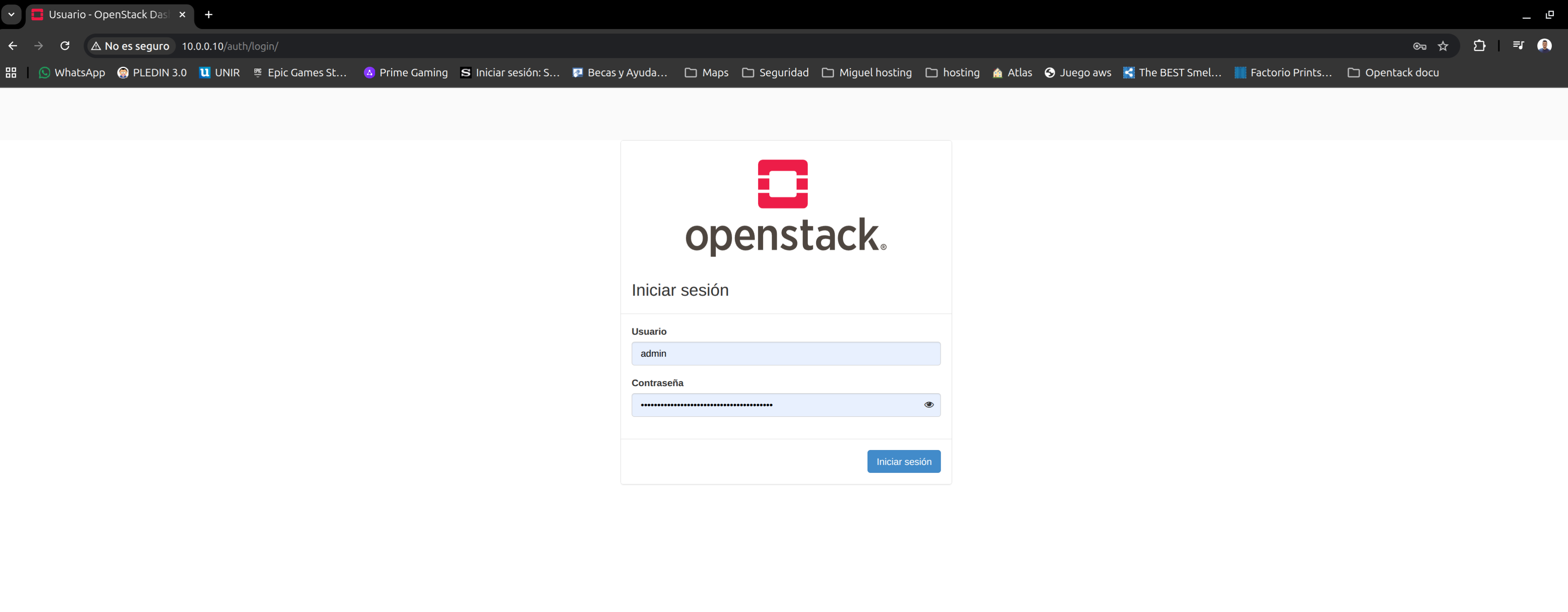
First log in, in our case you can get the username and password from /etc/kolla/admin-openrc.sh.
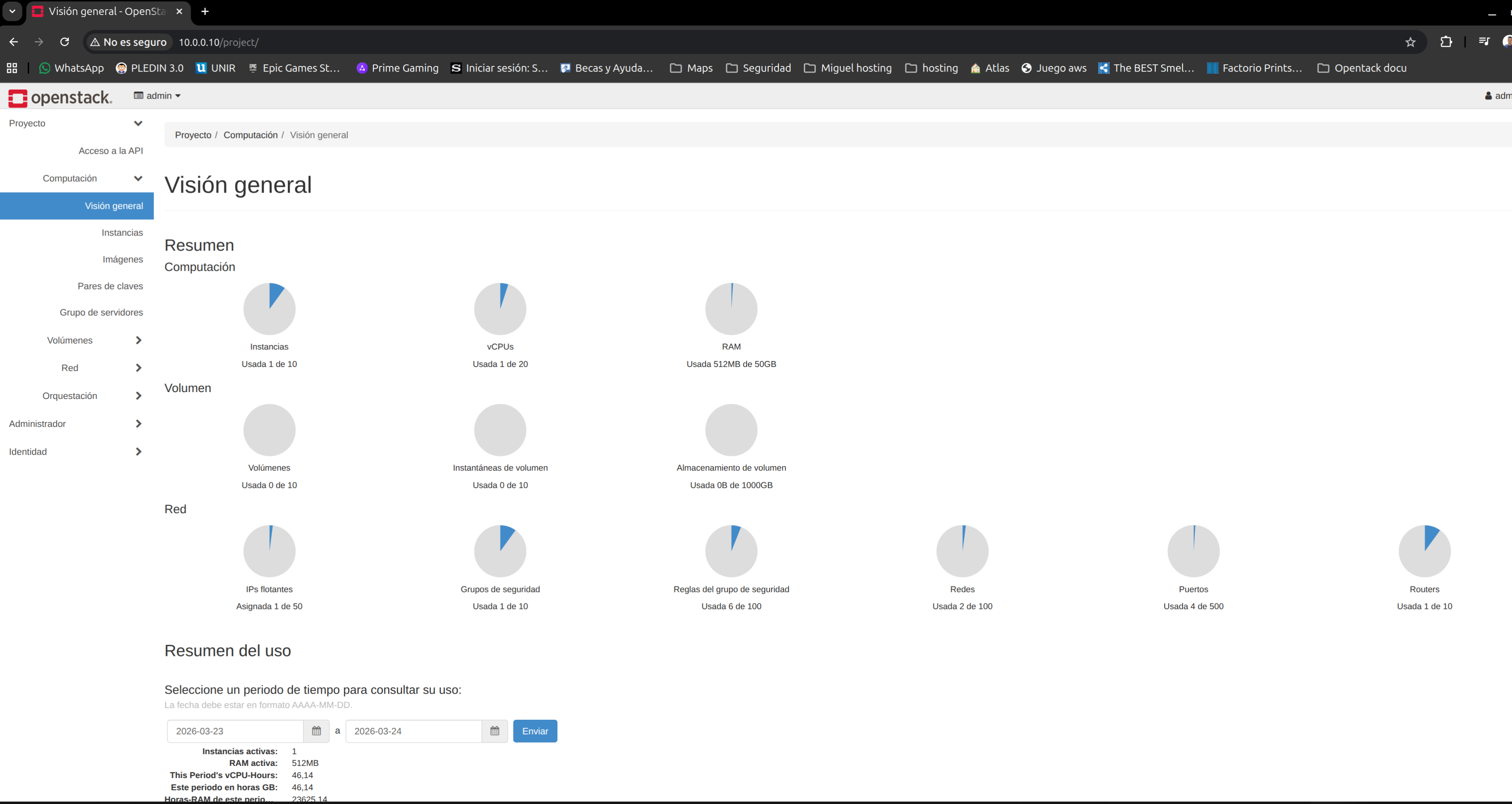
Once inside, you can see a view of the OpenStack cluster resources in use:
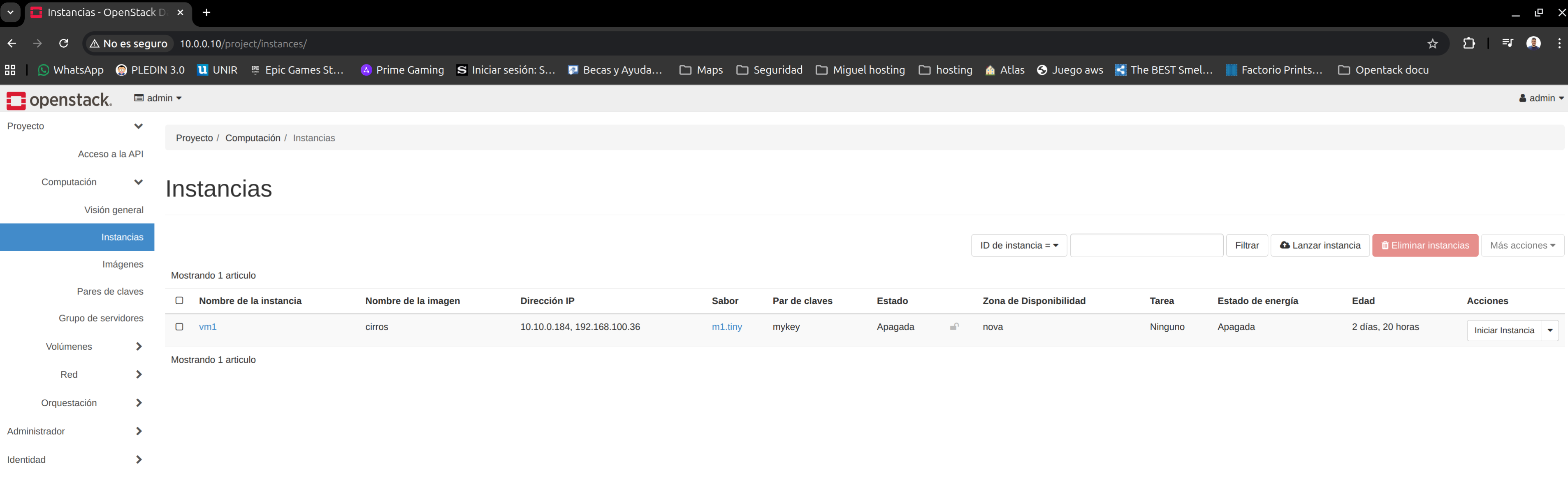
List the instance we created and check its status:
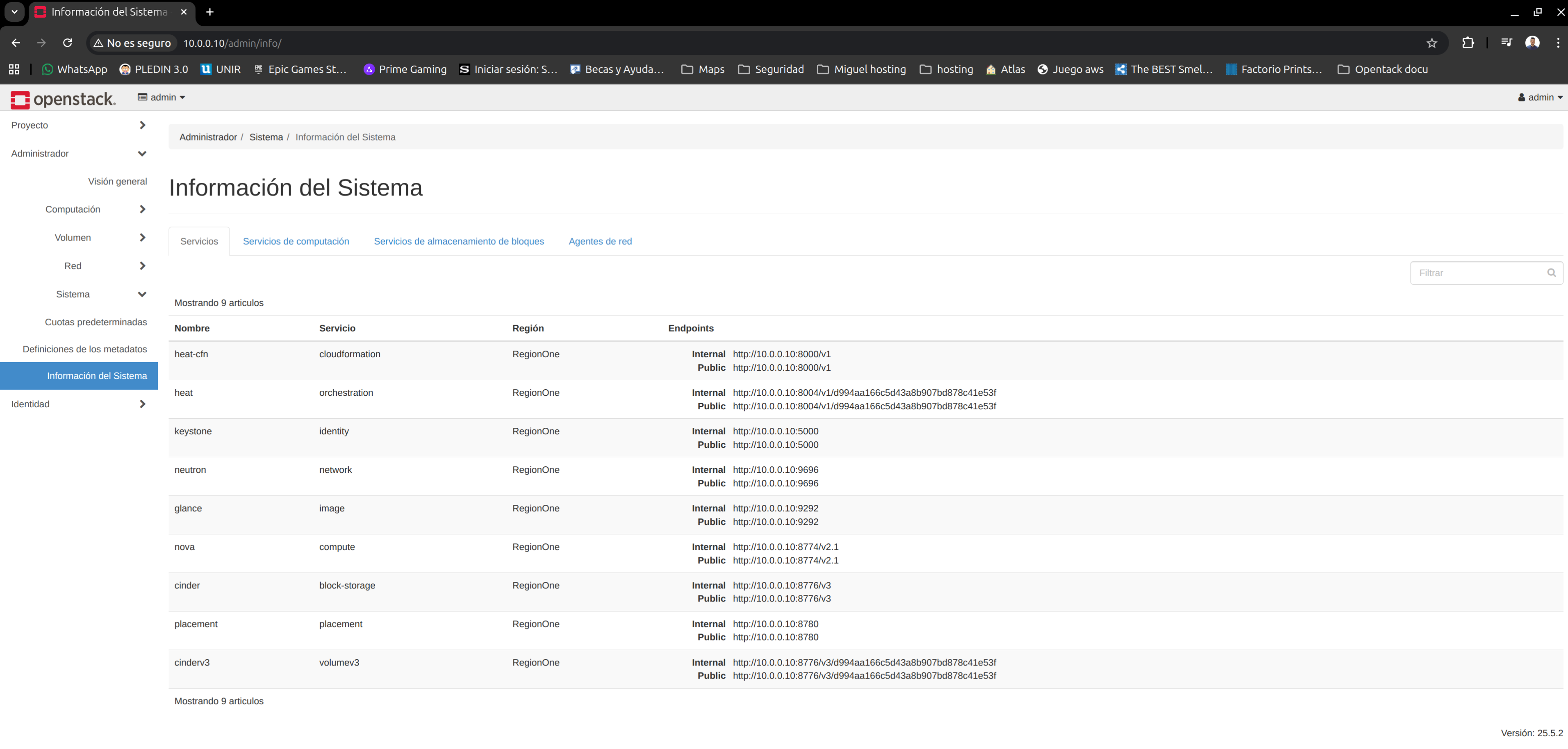
You can also see the services we deployed:
That is it for this post. The goal was to show, practically, how to deploy a basic OpenStack install in a lab environment, understanding the key steps and components involved in the process.