
Francisco Javier Cruces Doval
Sunday, July 26, 2026 | 7 minutes
JWT Auth in Kong
A JSON Web Token carries claims about an identity inside a signed token. Kong can verify its signature and time constraints before the request reaches the backend.
This article separates the token structure, the cryptographic credential stored in Kong, and the Consumer representing the client. We then build a reproducible Kong Ingress Controller lab with an HS256-signed JWT and a /jwt route.
This lab continues directly from Installing KIC. It reuses the kong Gateway, the echo Service, and the 192.168.121.200 address assigned by MetalLB to kong-gateway-proxy.
The tests were run with Kong Gateway 3.10.0.16 and Kong Ingress Controller 3.5.
1. What is a JWT?
JWT, or JSON Web Token, is a format defined by RFC 7519. A token contains three dot-separated parts:
header.payload.signature
The header describes the token type and algorithm:
{
  "typ": "JWT",
  "alg": "HS256"
}
The payload contains claims. This lab uses:
{
  "iss": "jwt-client",
  "iat": 1785052800,
  "exp": 1785053100
}
issidentifies the issuer and lets Kong locate the JWT credential.iatrecords when the token was issued.exprecords when it expires.
The first two parts are Base64URL-encoded, and the issuer then signs the result:
Base64URL(header) + "." + Base64URL(payload)
                         |
                         v
                  HMAC-SHA256
                         |
                         v
                  Base64URL signature
Base64URL is an encoding, not encryption. Anyone who receives the token can read it. The signature detects changes, but JWTs must be sent over HTTPS and must not contain secrets in the payload.
This lab uses HS256, a symmetric algorithm where the issuer and Kong share one secret. It is useful for understanding the flow, but asymmetric algorithms are often preferable with multiple issuers or verifiers because Kong then needs only the public key.
2. How does the JWT plugin work in Kong Gateway?
Kong performs validation through the official jwt plugin. It supports traditional, hybrid, and DB-less topologies and can be applied globally, to a Service, or to a Route.
This lab applies it only to /jwt.
The client sends the token as a Bearer credential:
Authorization: Bearer <token>
When a request matches the Route, Kong:
- Extracts the JWT.
- Decodes its header and payload.
- Reads the configured identifier claim, which defaults to
iss. - Finds a JWT credential whose
keymatches that value. - Checks that the token algorithm matches the credential.
- Verifies the signature.
- Verifies
exp, because it is listed inclaims_to_verify. - Identifies the Consumer and proxies the request when every check succeeds.
The following diagram brings these checks together. The plugin does not trust the JWT contents merely because it can decode them. It must find the credential through iss and validate the algorithm, signature, and expiration.
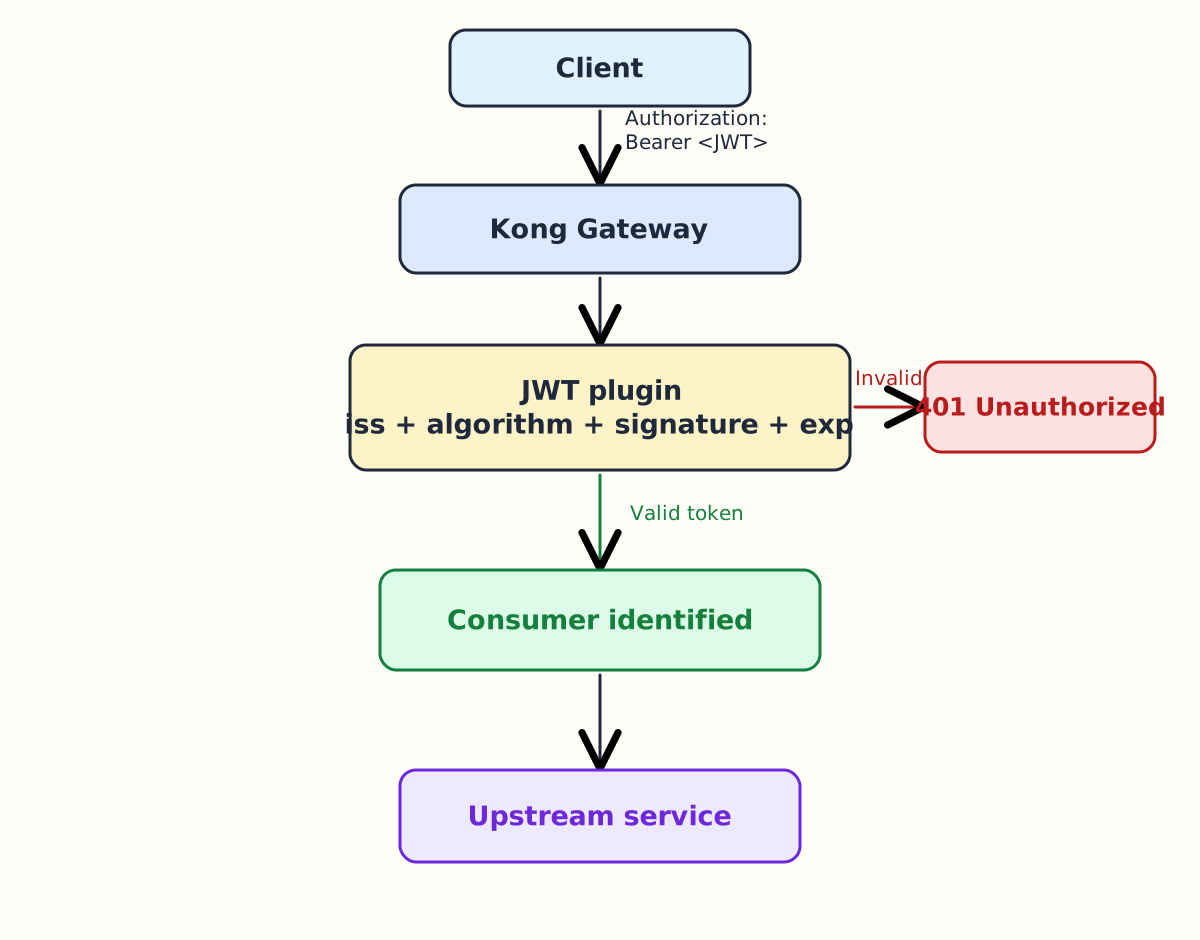
The resulting behavior is:
- A missing token returns
401 Unauthorized. - A malformed token, invalid signature, or unknown
issreturns401 Unauthorized. - An expired token returns
401 Unauthorized. - A valid token identifies the Consumer and allows the request through.
- Rejected JWTs never reach the upstream.
The plugin authenticates the identity associated with the credential but does not grant detailed permissions on its own. Authorization can be added with ACL or another plugin that uses the validated Consumer or claims.
3. Consumers, credentials, and JWTs
Three separate objects take part:
- The Consumer represents the client inside Kong.
- The JWT credential stores the identifier, algorithm, and cryptographic material.
- The token is the temporary proof sent with each request.
Do not confuse these values:
jwt-clientis theKongConsumerresource name.jwt-clientis also the Consumer username.jwt-clientis the credentialkeyand the token’siss.jwt-shared-secretsigns and verifies the token.
Their relationship is:
Consumer
    |
    +-- JWT credential
            |
            +-- key
            +-- algorithm
            +-- secret
                    |
                    +-- verifies the token signature
The repeated values make the lab easier to follow but belong to different fields. Kong does not trust the token text alone: it locates the credential through iss and then verifies the signature cryptographically.
4. Configuring JWT in Kong with KIC
We publish echo through an HTTPRoute and protect it with the JWT plugin.
The lab reuses the kong Gateway, echo Service, and proxy created during KIC installation. It adds only a KongPlugin, Secret, KongConsumer, and HTTPRoute.
4.1. Relationship between Kubernetes and Kong resources
| Kubernetes resource | Internal Kong resource |
|---|---|
KongPlugin | plugins |
Secret | jwt_secrets |
KongConsumer | consumers |
HTTPRoute | routes, services, upstreams, and targets |
In DB-less mode these entities are kept in memory. In traditional mode they are stored in Kong’s database.
4.2. Create the JWT plugin
claims_to_verify selects the time claims Kong must validate. Here, the token must not have passed exp.
apiVersion: configuration.konghq.com/v1
kind: KongPlugin
metadata:
  name: jwt
  namespace: javier
plugin: jwt
config:
  claims_to_verify:
    - exp
The Route association is added later through the HTTPRoute.
4.3. Create the JWT credential
The konghq.com/credential: jwt label tells KIC how to interpret the Secret fields.
apiVersion: v1
kind: Secret
metadata:
  name: jwt-credential
  namespace: javier
  labels:
    konghq.com/credential: jwt
stringData:
  key: jwt-client
  secret: jwt-shared-secret
  algorithm: HS256
key is the value Kong looks up from iss, secret contains the symmetric key, and algorithm prevents a different algorithm from being accepted.
stringData is not encryption. Kubernetes Base64-encodes these values when storing the Secret.
4.4. Create the KongConsumer
apiVersion: configuration.konghq.com/v1
kind: KongConsumer
metadata:
  name: jwt-client
  namespace: javier
  annotations:
    kubernetes.io/ingress.class: kong
username: jwt-client
credentials:
  - jwt-credential
KIC creates the Consumer and associates the JWT credential. In traditional mode they correspond to consumers and jwt_secrets.
4.5. Create the HTTPRoute
apiVersion: gateway.networking.k8s.io/v1
kind: HTTPRoute
metadata:
  name: jwt
  namespace: javier
  annotations:
    konghq.com/plugins: jwt
spec:
  parentRefs:
    - name: kong
      namespace: kong
  hostnames:
    - echo.javiercd.es
  rules:
    - matches:
        - path:
            type: PathPrefix
            value: /jwt
      backendRefs:
        - name: echo
          port: 80
The annotation applies the plugin only to the Route generated by this resource.
4.6. Apply the manifests
sudo kubectl apply -f 13-jwt-plugin.yaml
sudo kubectl apply -f 13-jwt-secret.yaml
sudo kubectl apply -f 13-jwt-consumer.yaml
sudo kubectl apply -f 13-jwt-httproute.yaml
Check the status:
sudo kubectl get kongplugin jwt -n javier
sudo kubectl get kongconsumer jwt-client -n javier
sudo kubectl get httproute jwt -n javier
sudo kubectl describe httproute jwt -n javier
5. Testing JWT authentication
The following responses came directly from Kong Gateway in the VM.
5.1. Request without a token
curl -i http://echo.javiercd.es/jwt
Kong responds before contacting the upstream:
HTTP/1.1 401 Unauthorized
Date: Sun, 26 Jul 2026 09:02:01 GMT
Content-Type: application/json; charset=utf-8
Connection: keep-alive
WWW-Authenticate: Bearer
Content-Length: 26
X-Kong-Response-Latency: 0
Server: kong/3.10.0.16-enterprise-edition
X-Kong-Request-Id: 748a483ab408712bc869dd29814f1426

{"message":"Unauthorized"}
5.2. Generate a valid JWT
The following block manually creates an HS256 token valid for five minutes. Run it on the host with openssl installed:
NOW="$(date +%s)"
HEADER='{"typ":"JWT","alg":"HS256"}'
PAYLOAD="{\"iss\":\"jwt-client\",\"iat\":${NOW},\"exp\":$((NOW+300))}"

b64url() {
  echo -n "$1" \
    | openssl base64 -A \
    | tr '+/' '-_' \
    | tr -d '='
}

UNSIGNED="$(b64url "${HEADER}").$(b64url "${PAYLOAD}")"
SIGNATURE="$(echo -n "${UNSIGNED}" \
  | openssl dgst -sha256 -hmac 'jwt-shared-secret' -binary \
  | openssl base64 -A \
  | tr '+/' '-_' \
  | tr -d '=')"
TOKEN="${UNSIGNED}.${SIGNATURE}"
Inspect the generated token:
echo "${TOKEN}"
5.3. Send the correct JWT
curl -i \
  -H "Authorization: Bearer ${TOKEN}" \
  http://echo.javiercd.es/jwt
Kong locates the credential through iss, validates the signature, and checks exp. The request reaches the upstream:
HTTP/1.1 200 OK
Content-Type: text/plain; charset=utf-8
Content-Length: 28
Connection: keep-alive
X-App-Name: http-echo
X-App-Version: 1.0.0
Date: Sun, 26 Jul 2026 09:02:01 GMT
Server: kong/3.10.0.16-enterprise-edition
X-Kong-Upstream-Latency: 0
X-Kong-Proxy-Latency: 1
Via: 1.1 kong/3.10.0.16-enterprise-edition
X-Kong-Request-Id: d3bba04b5e08ff056419853b6d34f67a

Hola desde Kong Gateway KIC
5.4. Check an invalid signature
Change one signature character:
INVALID_TOKEN="${UNSIGNED}.A${SIGNATURE:1}"

curl -i \
  -H "Authorization: Bearer ${INVALID_TOKEN}" \
  http://echo.javiercd.es/jwt
The value still has JWT syntax, but its signature no longer matches the header and payload. The real response is:
HTTP/1.1 401 Unauthorized
Date: Sun, 26 Jul 2026 09:02:01 GMT
Content-Type: application/json; charset=utf-8
Connection: keep-alive
WWW-Authenticate: Bearer error="invalid_token"
Content-Length: 31
X-Kong-Response-Latency: 0
Server: kong/3.10.0.16-enterprise-edition
X-Kong-Request-Id: 1625d86d92126922fa34d20c91149009

{"message":"Invalid signature"}
5.5. Check expiration
Generate another token with exp in the past:
EXPIRED_PAYLOAD="{\"iss\":\"jwt-client\",\"iat\":$((NOW-600)),\"exp\":$((NOW-300))}"
EXPIRED_UNSIGNED="$(b64url "${HEADER}").$(b64url "${EXPIRED_PAYLOAD}")"
EXPIRED_SIGNATURE="$(echo -n "${EXPIRED_UNSIGNED}" \
  | openssl dgst -sha256 -hmac 'jwt-shared-secret' -binary \
  | openssl base64 -A \
  | tr '+/' '-_' \
  | tr -d '=')"
EXPIRED_TOKEN="${EXPIRED_UNSIGNED}.${EXPIRED_SIGNATURE}"

curl -i \
  -H "Authorization: Bearer ${EXPIRED_TOKEN}" \
  http://echo.javiercd.es/jwt
The signature is correct, but the token has expired. Because claims_to_verify includes exp, Kong rejects it:
HTTP/1.1 401 Unauthorized
Date: Sun, 26 Jul 2026 09:02:01 GMT
Content-Type: application/json; charset=utf-8
Connection: keep-alive
WWW-Authenticate: Bearer error="invalid_token"
Content-Length: 23
X-Kong-Response-Latency: 0
Server: kong/3.10.0.16-enterprise-edition
X-Kong-Request-Id: 6aaf9d5956c01c57fa807168eefe7942

{"exp":"token expired"}